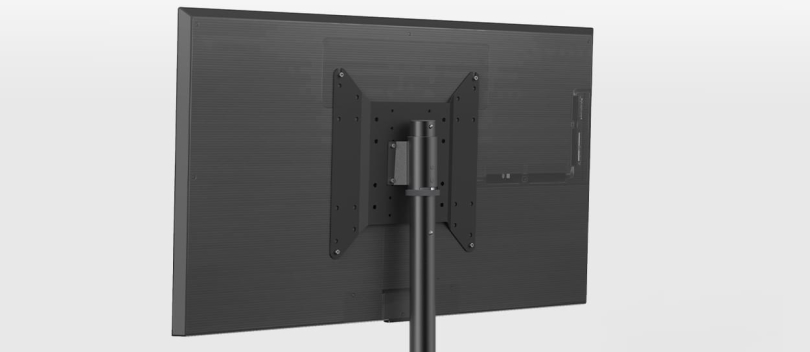
If you have ever tried to mount a television or monitor on the wall, or if you have considered purchasing a universal television or monitor stand, you have likely encountered the term “VESA”. But what exactly does this mean? And why is it so important? Let us take a closer look at the VESA size in this blog.
VESA: What is it exactly?
VESA stands for “Video Electronics Standards Association”. This is an international non-profit organisation that sets standards for the video electronics industry. One of the best-known standards introduced by VESA is the standard for mounting flat-screen TVs and monitors. This standard is better known as the VESA size.
The VESA size ensures that you can fit your screen with a TV bracket and differs for each type of television. If you want to mount a television using a TV bracket, it is important that you know the VESA size of the television. If the VESA size of the television does not match the VESA size of the bracket, the television will not be able to be mounted on the TV bracket.
What exactly is the VESA size?
The VESA size refers to the distance between the four mounting holes on the back of a flat-screen television or monitor. This size is always expressed in millimetres and indicates the horizontal and vertical distance between the mounting points, for example 200x200 mm or 400x400 mm. When people search for what a VESA size means, it almost always refers to these distances.
Having a standardised VESA size allows manufacturers of TV brackets and stands to design products that fit a wide range of screens, regardless of brand or model. This also applies to speaker stands.
Where exactly are the VESA mounting points?
In the past, the four mounting holes, or the VESA size, were always in the centre of your screen. That's why people often referred to it as the “height of the centre of the screen”. But that has changed. Now we talk about the “height of the centre of the VESA size”, because not all new TVs have mounting points in the centre.
Take some LG OLED TVs, for example. All the technical components are located at the bottom of the TV and the top is just a thin piece of glass. It looks nice, but it also means that the mounting points are at the bottom. And that means that many standard TV brackets don't fit. Other OLED TVs do have mounting points closer to the centre.
Q-LED screens often have the mounting points just above the centre. You should also take this into account.
What should you look out for when buying something to mount your television?
If the VESA mounting points are in the centre of your screen, you don't need to worry. But if they are located elsewhere, there are a few things you should keep in mind:
- TV brackets: Many TV brackets have horizontal arms. If the VESA size of your television is too low, those arms may protrude below or above your television. It is better to choose a bracket that fits exactly, or one with horizontal mounting.
- TV stands: The same applies to TV stands. Many stands have vertical arms, so if the VESA size is too low or too high, those arms may protrude. It is better to choose a stand with horizontal arms or one that fits perfectly.
People also sometimes talk about “height of the centre of the screen” when discussing a TV stand. But they should actually be talking about “height of the centre of the VESA size”.
Why is VESA important?
The VESA size is important for several reasons:
- Universal compatibility: Thanks to the VESA standard, consumers can purchase any TV bracket or stand and be confident that it will fit their TV or monitor.
- Safety: By following a standard VESA size, manufacturers can ensure that the bracket or stand can safely support the weight and size of the screen.
- Convenience: It eliminates the confusion of choosing the right mounting solution for your screen.
So what is a VESA adapter?
A VESA adapter is a tool used to adjust the mounting points of a television or monitor so that it can be used with a VESA mounting stand. Not all screens have a VESA-compatible size from the factory, and in such cases, a VESA adapter can provide the solution.
Which screws are included with the TV brackets?
The standard screw sizes are usually used for most televisions. For example, televisions with a VESA size of 200x200 typically have M6 screws, while those with a VESA size of 400x400 have M8 screws. These sizes are standard for many manufacturers. However, it is possible that the television has unique dimensions, meaning that the screws supplied do not fit. In such cases, it is best to go to a specialist shop to buy the appropriate screws.
Mounting point dimensions
- TV stand VESA 100x100 - The mounting points are 10 cm apart
- TV stand VESA 200x200 - The mounting points are 20 cm apart
- TV stand VESA 300x300 - The mounting points are 30 cm apart
- TV stand VESA 400x200 - The mounting points are 40 cm apart horizontally and 20 cm apart vertically
- TV stand VESA 400x400 - The mounting points are 40 cm apart
What is the VESA size of my television?
If you want to know the VESA size of your television, there are several ways to find out:
- Consult the manual: Most television and monitor manuals list the VESA size.
- Check the back of the screen: Measure the distance (in millimetres) between the four mounting holes horizontally and vertically.
- Manufacturer's website: Manufacturers often list product specifications online, including the VESA size.
- Contact the manufacturer: If you cannot find it, you can always contact the manufacturer for more information.